TL;DR
PostgreSQL query optimization follows a repeatable workflow: find the queries that actually cost you time with pg_stat_statements, inspect them with EXPLAIN (ANALYZE, BUFFERS), fix the usual suspects (stale statistics, missing or wrong indexes, bad join strategies, low work_mem), then verify the improvement and keep monitoring. Don't guess — measure first.
Introduction
PostgreSQL query optimization is less about memorizing tricks and more about following a disciplined process: identify which queries are slow, understand why the planner chose a particular plan, apply a targeted fix, and verify the result. Most slow queries in production trace back to a small set of causes — stale planner statistics, a missing index, an index the planner can't use, or a join strategy that falls apart once tables grow.
This guide walks through that process step by step. It's aimed at backend developers, DBAs, and tech leads who need to fix slow PostgreSQL queries in production systems, not toy examples. Where behavior depends on your workload, we'll point out how to decide for yourself.
How the PostgreSQL Query Planner Works
Before optimizing anything, you need a working mental model of what happens between SELECT and the first row of output.
From SQL to execution plan
PostgreSQL does not execute your SQL directly. It parses the statement, rewrites it, and then the query planner enumerates candidate execution plans — different scan methods, join orders, and join algorithms — estimating the cost of each one. The cheapest plan wins and becomes the query plan the executor runs.
This has a key implication for PostgreSQL SQL tuning: you don't tell PostgreSQL how to run a query. You give it good inputs (accurate statistics, appropriate indexes, sane settings) so the planner makes good choices on its own. Planner hints exist only via extensions, not in core.
Statistics and cost estimation
The planner's decisions are only as good as its statistics. ANALYZE samples each table and stores per-column data in pg_statistic (viewable via pg_stats): distinct values, most common values, null fraction, and correlation. From these, the planner estimates cardinality — how many rows each operator will produce — and converts that into cost estimates (page and CPU costs).
If the statistics are stale or misrepresent your data distribution (for example, a highly skewed column where ANALYZE's most-common-value list misses a frequently used value), the planner will confidently pick a bad plan. Row estimates that are off by orders of magnitude are the single most common root cause of a slow query.
Why the planner chooses a sequential scan
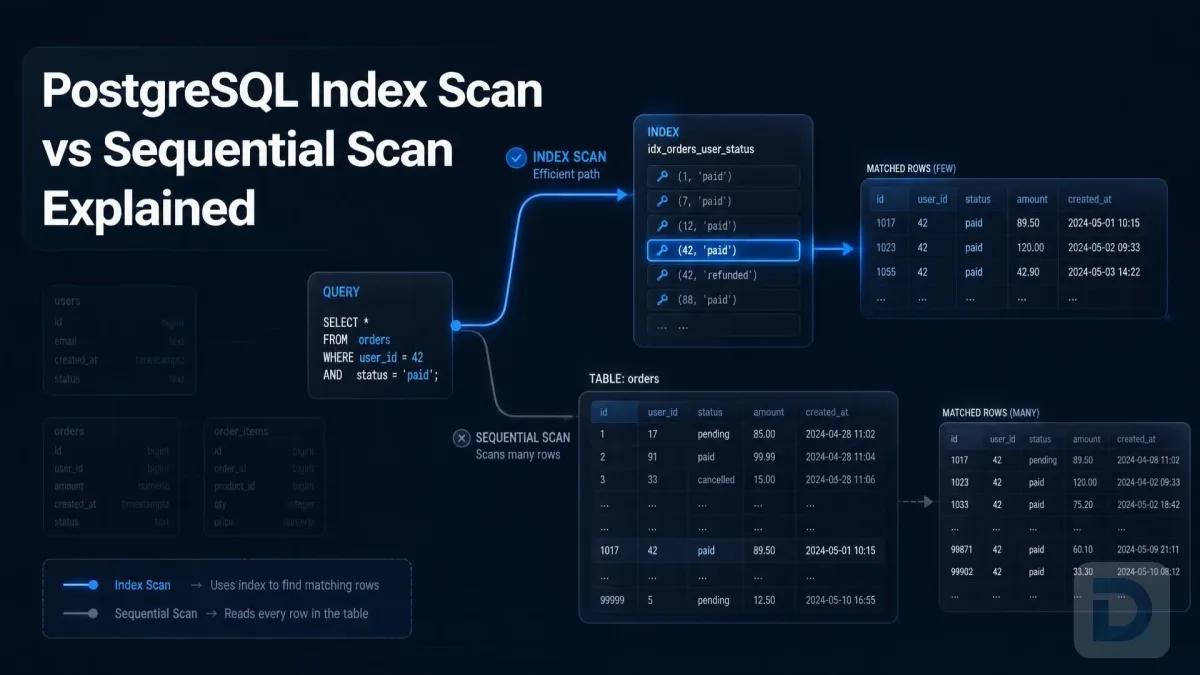
Developers often assume a sequential scan is a bug. It isn't always. The planner compares the estimated cost of reading a fraction of the table via an index (random I/O is expensive) against scanning the whole table sequentially (which is very cache-friendly). If your query matches a large share of rows — say 10–20% or more, depending on the table and cache size — a sequential scan can legitimately be the faster choice.
The rule of thumb: a sequential scan on a huge table for a query that should return a handful of rows is a red flag. A sequential scan that returns a third of the table is often correct. We cover how to read plans in detail below, and our guide to index scan vs sequential scan explains the trade-off in depth.
Step 1: Find the Slow Queries
Optimizing queries nobody runs is wasted effort. Start by measuring which statements actually consume the most resources.

The PostgreSQL query optimization workflow
Using pg_stat_statements
pg_stat_statements is the standard tool for this. It's a contrib extension that aggregates execution statistics per normalized query: total time, call count, mean time, rows returned, and more.
-- Requires: CREATE EXTENSION pg_stat_statements;
-- and shared_preload_libraries = 'pg_stat_statements' in postgresql.conf
SELECT
  calls,
  round(total_exec_time::numeric, 1) AS total_ms,
  round(mean_exec_time::numeric, 1)  AS mean_ms,
  rows,
  left(query, 80) AS query
FROM pg_stat_statements
ORDER BY total_exec_time DESC
LIMIT 10;
Sort by total_exec_time to find the queries that dominate database load, or by mean_exec_time to find outliers that are individually slow. Both matter; they lead to different priorities.
Logging slow queries
As a complement, enable slow-query logging so you have a record even for one-off statements:
log_min_duration_statement = 500 # ms
Any statement running longer than 500 ms gets logged (tune the threshold to your SLA; setting it too low floods the log with noise).
Prioritizing by frequency and impact
Rank candidates by a simple calculation: total impact ≈ mean execution time × calls per hour. A 2-second query running once a minute is a real problem. A 2-second query that runs once a year during a migration probably isn't. Fix the high-impact queries first, and move on once each is demonstrably faster.
Step 2: Read the Plan with EXPLAIN ANALYZE
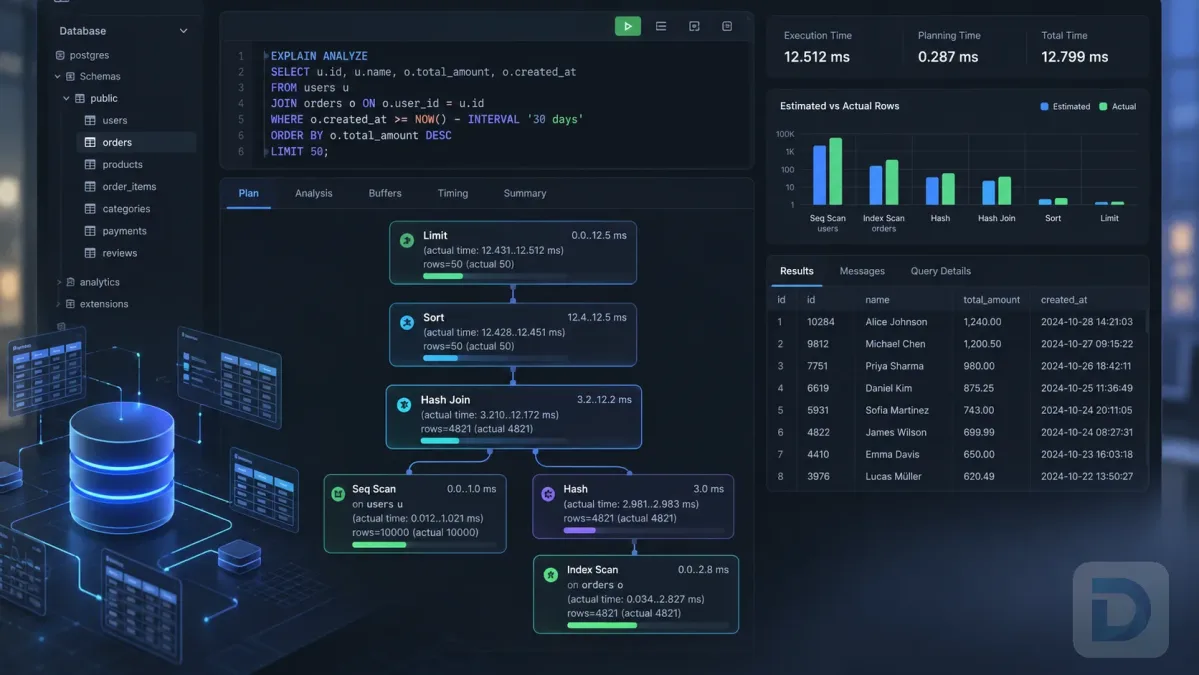
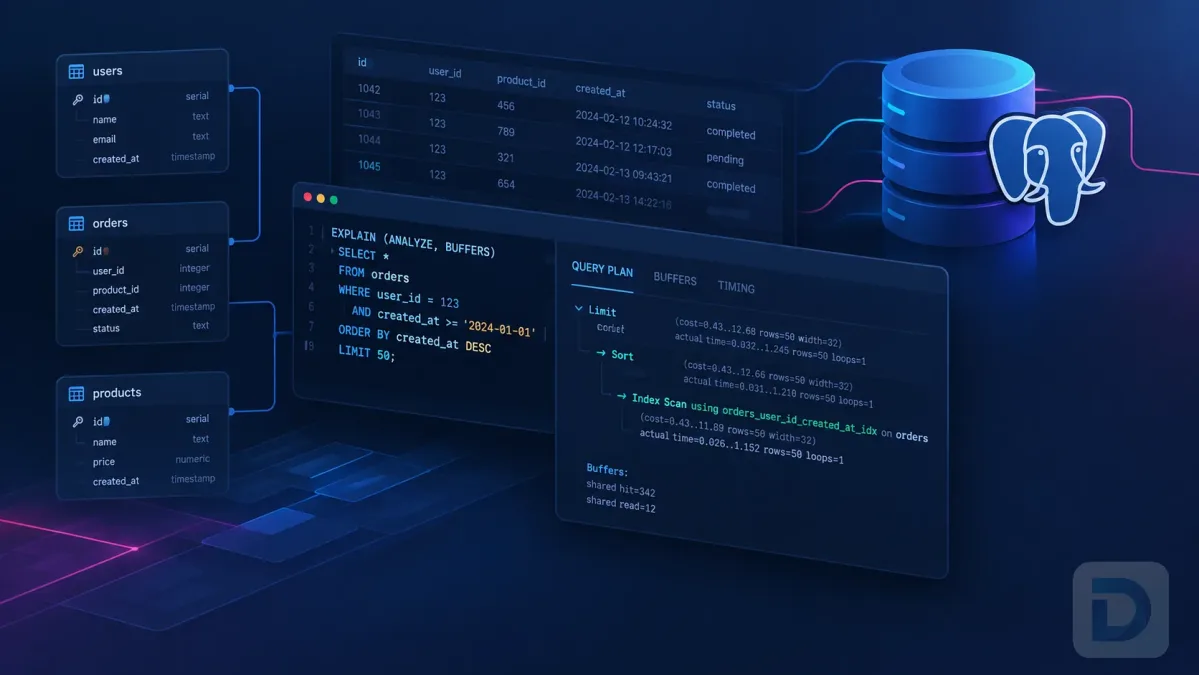
Once you've picked a target, get its execution plan. postgresql explain analyze output is the primary diagnostic tool for this entire discipline.
EXPLAIN (ANALYZE, BUFFERS, FORMAT TEXT)
SELECT o.id, o.total
FROM orders o
JOIN customers c ON c.id = o.customer_id
WHERE o.status = 'pending'
  AND o.created_at > now() - interval '7 days';
Use plain EXPLAIN (without ANALYZE) for INSERT, UPDATE, or DELETE statements you don't want to actually run. EXPLAIN ANALYZE executes the query — including any writes.
Key plan nodes to recognize
Read the plan as a tree from the innermost nodes upward. The most common nodes, and what they tell you:
| Plan node | What it means | Healthy when | Warning sign |
|---|---|---|---|
| Seq Scan | Reads every table row | Small table, or a large fraction of rows matched | Huge table, query expects few rows |
| Index Scan | B-Tree lookup + row fetches | Highly selective predicate, many rows needed | Heap fetches dominating with a bloated table |
| Index Only Scan | Answers from the index alone | All referenced columns are in the index | Visibility map not up to date (needs vacuum) |
| Nested Loop | Outer row drives inner lookup | Inner side returns few rows per outer row | Inner side scans thousands of rows per loop iteration |
| Hash Join | Builds an in-memory hash of one side | Hash fits in work_mem | Hash spills to disk (noticeable slowdown) |
| Merge Join | Merges two sorted inputs | Inputs are pre-sorted or cheap to sort | Large explicit sorts just to feed the join |
| Sort | Orders rows in memory or on disk | Fits in work_mem ("Sort Method: quicksort") | "external merge Disk:" — it spilled to disk |
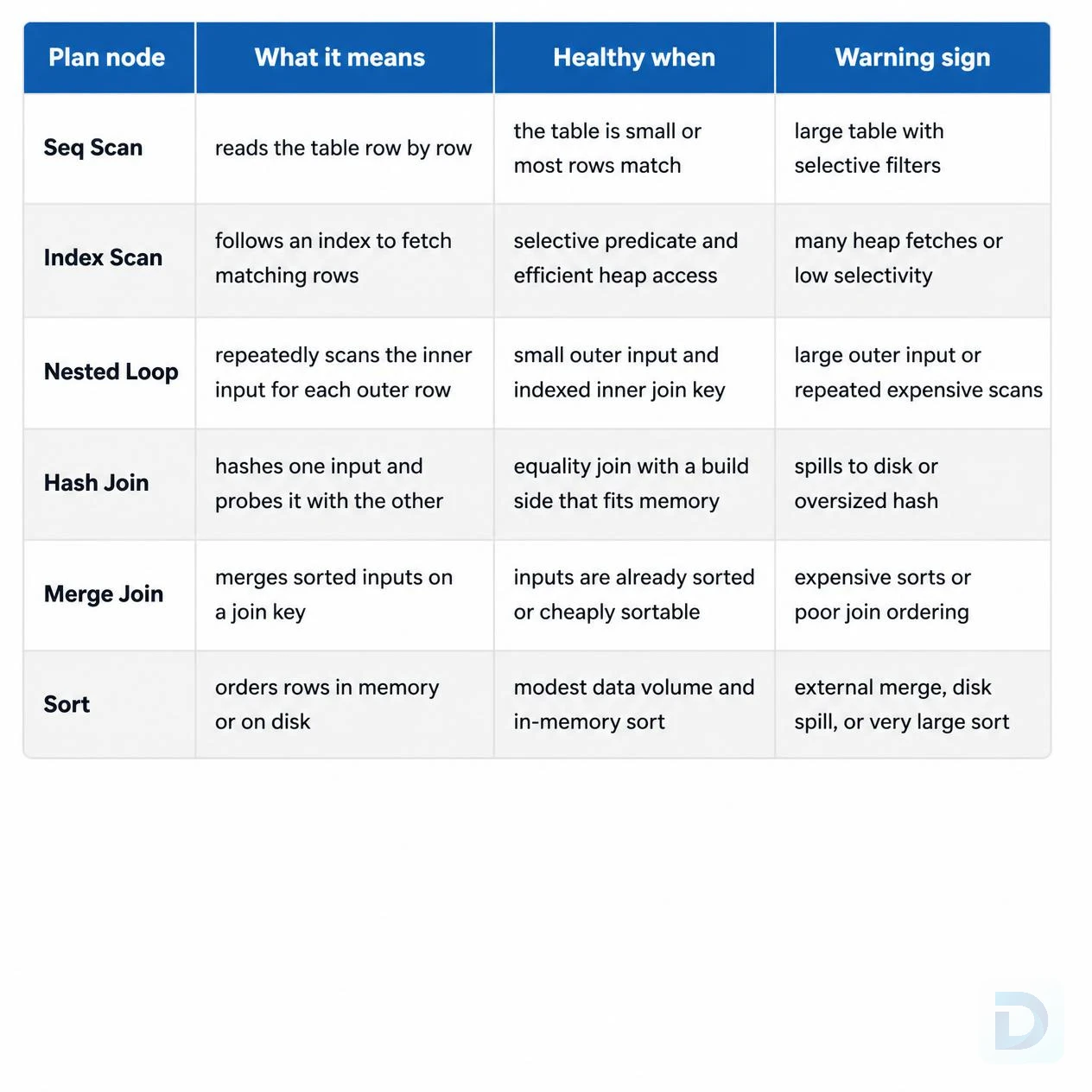
Common EXPLAIN plan nodes and when they signal trouble
Estimated vs actual rows
Every node in EXPLAIN ANALYZE output shows rows=... twice: the planner's estimate and the actual number, across all loops. Compare them at each node.
->  Seq Scan on orders  (cost=0.00..25375.00 rows=9 width=16)
                        (actual time=0.42..112.60 rows=48310 loops=1)
An estimate of 9 rows against 48,310 actual rows is the smoking gun: the planner is optimizing for the wrong cardinality, which explains a bad join choice elsewhere in the plan. When you see this, fix the statistics before touching anything else (see Step 4).
Buffers, loops, and sorting
Add BUFFERS to see where the query actually spends time:
- Shared hit vs read —
readcounts blocks fetched from disk or the OS cache. Highreadnumbers mean the working set doesn't fit in cache. - loops — a node may execute once per outer row. The reported
actual timeis per loop, not total; multiply byloopsto get real cost. - Sort Method — "external merge Disk: 25000kB" means the sort spilled to disk. This is the classic symptom of
work_membeing too small for the operation.
Step 3: Apply Common Optimization Techniques
With the bottleneck identified, choose a fix that matches the diagnosis. These are the highest-yield techniques for how to optimize PostgreSQL queries in practice.
Adding the right indexes
If the plan shows a sequential scan on a large table for a selective predicate, you likely need an index. Match the index to the query, not just the column:
- Single-column lookups: a plain B-Tree index is usually right.
- Multi-column predicates: a composite index with equality columns first, range column last (see composite index best practices).
- Coverage: if the index contains every column the query reads, you get an Index Only Scan, which avoids heap access entirely.
Before adding an index, check whether a suitable one already exists — and whether the planner refuses it for a reason like data type mismatch or a function wrapping the column. If you're not sure what's missing, the methods in how to find missing indexes in PostgreSQL help you identify candidates systematically, and finding unused indexes keeps you from letting the fix become its own problem: every index slows writes and consumes space.
Rewriting joins and filters
A postgresql slow query is sometimes just an awkwardly written query:
- Join on indexed columns on both sides where the plan expects it.
- Filter early: push restrictive predicates into subqueries so the planner processes smaller row sets — though modern planners do much of this automatically, writing it clearly helps both the planner and the next reader.
- Avoid
SELECT *when you only need a few columns; it blocks Index Only Scans and inflates I/O. - Watch out for
ORacross different columns — it often forces a bitmap-OR of multiple indexes or a sequential scan. Sometimes aUNIONof two indexed queries plans better. - Replace
DISTINCTused to mask a bad join: fix the join instead of deduplicating the symptom.
Avoiding functions on indexed columns
The planner can only use a plain B-Tree index when the predicate matches the index definition. Wrapping the indexed column in a function or cast disables it:
-- Cannot use a plain index on created_at:
WHERE date(created_at) = '2025-01-15'

-- Can use it:
WHERE created_at >= '2025-01-15'
  AND created_at <  '2025-01-16'

-- Or index the expression explicitly:
CREATE INDEX orders_created_date_idx ON orders (date(created_at));
Expression indexes are the general-purpose answer here; our guide to PostgreSQL expression indexes covers the syntax and trade-offs.
Paginating efficiently with LIMIT and keyset pagination
OFFSET 100000 LIMIT 20 forces PostgreSQL to compute and discard 100,000 rows on every request. Keyset (cursor) pagination avoids this entirely:
-- Instead of: WHERE ... OFFSET 100000 LIMIT 20
SELECT id, subject
FROM tickets
WHERE (created_at, id) < ('2025-01-15 10:00:00', 48210)
ORDER BY created_at DESC, id DESC
LIMIT 20;
This pattern needs a matching composite index on (created_at DESC, id DESC) and returns constant-time pages regardless of depth.
Step 4: Tune Planner and Server Settings
Some slow queries aren't fixed by indexes or rewrites — the planner or the server configuration is the constraint. This is where PostgreSQL performance tuning gets into configuration territory.
Keeping statistics fresh with ANALYZE
If plans show badly wrong row estimates, run:
ANALYZE orders;
In most deployments autovacuum triggers ANALYZE automatically. For very large or rapidly changing tables, autovacuum's default thresholds may not fire often enough — lower autovacuum_analyze_scale_factor (or set a per-table value with ALTER TABLE ... SET (autovacuum_analyze_scale_factor = ...)) so statistics refresh on a sensible schedule. Stale statistics also correlate with index bloat, since VACUUM maintenance and planning accuracy tend to degrade together.
work_mem and memory settings
work_mem controls the memory available per sort and hash operation. When it's too small, those operations spill to disk — visible in the plan as an external merge sort or a hash batch count above one.
Two cautions:
work_memapplies per sort/hash node, per operation — a complex query can allocate it multiple times, and concurrent connections multiply this further. Don't set it to a fraction of RAM.- Prefer raising it for specific sessions or roles (
SET work_mem = '256MB') before changing the global default.
Related settings such as shared_buffers and effective_cache_size shape the planner's assumptions about caching. effective_cache_size in particular tells the planner how much memory the OS and PostgreSQL are likely to use for caching a single query's data — an undersized value makes the planner overly pessimistic about index scans. Base these on your actual machine, not defaults.
When to adjust planner cost constants
Settings like random_page_cost (default 4.0) model I/O cost. On modern SSD-backed systems, a lower value such as 1.1 often reflects reality and makes the planner friendlier toward index scans. Adjust these only when you can demonstrate a systematic bias — specific queries consistently choosing scans that are measurably slower — and verify with EXPLAIN ANALYZE before and after. As a rule, fix statistics and indexes first; cost constants are the last knob, not the first.
Step 5: Verify and Monitor Improvements
An optimization isn't done when the query looks faster in your dev environment. It's done when it's demonstrably faster in production — and stays that way.
Benchmarking before and after
- Capture the
EXPLAIN (ANALYZE, BUFFERS)plan before the change and compare it to the plan after. Look at execution time, the changed plan nodes, and buffer usage. - Re-run the query a few times to warm the cache; single cold-cache runs are misleading.
- Test with realistic data volumes. A query on a 10,000-row dev table tells you little about behavior at 50 million rows.
- Confirm the row estimates now match actuals at the nodes that were wrong before.
A GUI with a visual plan view — such as DBO Studio — makes side-by-side before/after comparisons much faster than reading raw plan text.
Setting up ongoing monitoring
Keep pg_stat_statements enabled permanently and review the top consumers periodically. Track a few long-lived indicators: total time by query, mean time trends, and cache hit ratios. Regression is common — a plan that's optimal today can become pathological after a data distribution shift or a version upgrade, so systematic index performance tuning and periodic reviews of your indexing strategy (see the full PostgreSQL indexing guide) should be part of routine maintenance, not a one-time project.
FAQ
EXPLAIN shows the planner's estimated plan without executing the query, while EXPLAIN ANALYZE actually runs the query and reports real execution times, row counts, and loops for each node. Use plain EXPLAIN on destructive statements and EXPLAIN ANALYZE when actual timings matter.
In most cases autovacuum handles this automatically. If row estimates in your plans are far off from actual rows, run ANALYZE manually or lower autovacuum_analyze_scale_factor for large, frequently updated tables.
No. Indexes help selective lookups but can slow down writes, and the planner will ignore them for low-selectivity queries. Use EXPLAIN ANALYZE to verify the index is actually used before and after adding it.
pg_stat_statements is the best starting point. It aggregates total time, call counts, and average runtime per query, so you can identify which statements are worth optimizing before inspecting individual plans.
Conclusion
PostgreSQL query optimization works best as a loop, not a rescue mission: measure with pg_stat_statements, diagnose with EXPLAIN (ANALYZE, BUFFERS), fix the matched problem — stale statistics, a missing or unusable index, a spilled sort, a bad join strategy — and verify the result with a before/after plan comparison.
Resist the temptation to tune configuration constants or add indexes blindly. The plan output usually tells you exactly which fix applies; your job is to read it carefully, apply the smallest change that addresses the root cause, and keep monitoring so regressions surface before your users notice them.
Key Takeaways
- Start with
pg_stat_statementsand prioritize queries by total impact (mean time × frequency), not anecdote. - Wrong row estimates in the plan usually mean stale statistics — run
ANALYZEbefore anything else. - Read
EXPLAIN (ANALYZE, BUFFERS)output node by node: compare estimated vs actual rows, checkloops, and look for disk spills in sorts and hashes. - Match indexes to queries (composite ordering, expression indexes, covering indexes) and verify usage; every index costs write performance.
- Use keyset pagination instead of large
OFFSETvalues on large tables. - Change planner cost constants only after statistics and indexes are verified correct — and always confirm with a before/after plan.
About the author

Founder & Lead Developer at DBO Studio
Full-stack developer and creator of DBO Studio, a modern database management tool. Passionate about PostgreSQL, MySQL, SQLite, database performance, developer productivity, and building tools that simplify database workflows.
Try this in DBO Studio
Explore PostgreSQL workflows visually in DBO Studio — schemas, queries, and plans in one place.
Our newsletter
Subscribe to DBO Studio’s newsletter for exclusive tutorials, tips & product updatesRelated posts