- How PostgreSQL Decides to Use (or Skip) an Index
- Method 1: Detect Sequential Scans with pg_stat_user_indexes
- Method 2: Trace Slow Queries with pg_stat_statements
- Method 3: Confirm the Culprit with EXPLAIN (ANALYZE, BUFFERS)
- Method 4: Catch Missing Indexes Automatically from Logs
- Creating the Right Index: A Decision Checklist
- Key Takeaways
- FAQ
- Conclusion
TL;DR
There is no built-in "missing index" advisor in PostgreSQL, so missing index detection is a four-step workflow: (1) scan pg_stat_user_tables for tables with heavy sequential scans, (2) use pg_stat_statements to find the slowest queries touching those tables, (3) confirm the culprit with EXPLAIN (ANALYZE, BUFFERS), and (4) automate plan capture with auto_explain for intermittent issues. Then create a targeted index and re-test. Jump to the decision checklist if you already know which query is slow.
If you have ever watched a query jump from 10 ms to 10 seconds as a table grew, there is a good chance you were looking at a missing index. Knowing how to find missing indexes in PostgreSQL is one of the highest-leverage skills for backend developers and DBAs, because an unindexed sequential scan is the single most common root cause of slow queries in production PostgreSQL systems.
PostgreSQL will not flag missing indexes for you — unlike SQL Server, it ships no official "missing index recommendations" feature. The good news: the built-in statistics views and planner tooling give you everything you need to diagnose the problem yourself. This article walks through a proven, repeatable workflow.
How PostgreSQL Decides to Use (or Skip) an Index
Before hunting for missing indexes, you need a mental model of why PostgreSQL skips them. Otherwise you will add indexes that the planner ignores.
The query planner and cost model in 60 seconds
PostgreSQL uses a cost-based optimizer. For every query, the planner estimates the cost of candidate plans — a sequential scan reading every heap page, an index scan doing random heap fetches, a bitmap heap scan mixing both — and picks the cheapest estimate. Its estimates are driven by statistics collected by ANALYZE: row counts (reltuples), value distributions, and correlation. If those statistics are stale, the planner can make bad choices, which is why ANALYZE is part of every tuning conversation.
Why a valid index can still be ignored
A btree index on the right column can still be skipped for legitimate reasons:
- Small tables. Reading a 200-row table sequentially is cheaper than the overhead of an index scan. This is fine and expected.
- Low selectivity. If
WHERE status = 'active'matches 80% of rows, a sequential scan wins. - Wildcard or expression predicates.
WHERE lower(email) = ...orLIKE '%term%'cannot use a plain btree index onemail. - Function wrapping.
WHERE date(created_at) = '2024-06-01'defeats an index oncreated_atunless you use a range predicate or an expression index. - Stale or absent statistics on a brand-new table or after a bulk load.

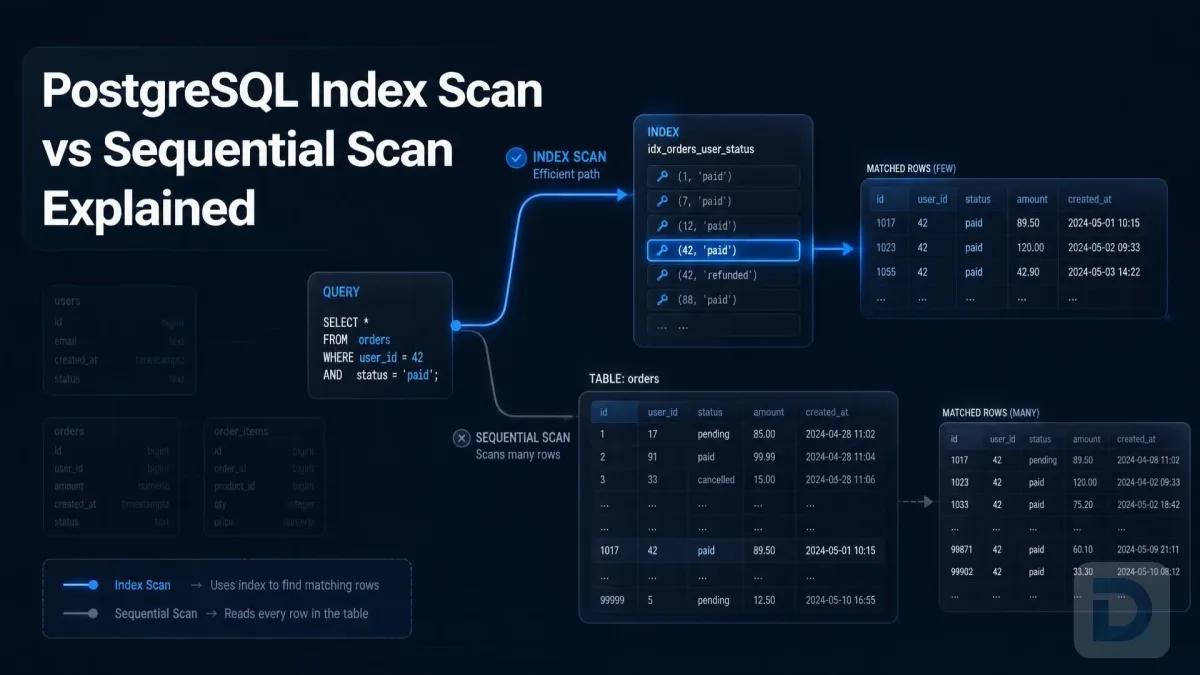
Seq Scan vs Index Scan: the same query, two very different plans
When adding an index is NOT the right fix
Not every slow query needs an index. Before you create one, rule out:
- Bad query structure —
SELECT *pulling hundreds of columns, or functions applied to indexed columns in theWHEREclause. - Stale statistics — run
ANALYZE tablename;and re-check the plan first. - Configuration issues — an undersized
work_memorshared_bufferscan make plans that look index-unfriendly actually be memory-related. - Lock contention or bloat — a bloated table inflates scan cost in ways an index will not fix.
Method 1: Detect Sequential Scans with pg_stat_user_indexes
The cumulative statistics in pg_stat_user_tables and pg_stat_user_indexes are your fastest PostgreSQL missing index detection signal. pg_stat_user_tables tracks seq_scan (sequential scans per table) and n_live_tup, while pg_stat_user_indexes tracks idx_scan per index. Compare them to find large tables being read without index support.

The missing index investigation workflow: from statistics to verified fix
Finding tables with high seq_scan and low idx_scan counts
This query surfaces big tables where sequential scans dominate:
SELECT
  relname            AS table_name,
  seq_scan,
  idx_scan,
  CASE WHEN seq_scan + idx_scan > 0
       THEN round(seq_scan::numeric / (seq_scan + idx_scan), 2)
       ELSE NULL
  END                AS seq_scan_ratio,
  n_live_tup
FROM pg_stat_user_tables
WHERE n_live_tup > 10000
ORDER BY seq_scan DESC
LIMIT 20;
Interpretation guide:
- High
seq_scan+ highn_live_tup— prime suspect. The table is big and being read the hard way. seq_scan_rationear 1.0 — almost no index usage at all.- High
seq_scanbut tinyn_live_tup— normal; small tables are scanned sequentially by design.
Next, check what indexes already exist on the suspect tables using the pg_indexes view:
SELECT indexname, indexdef
FROM pg_indexes
WHERE tablename = 'orders';
Calculating the scan ratio per table
The seq_scan_ratio column above is a quick health metric. Treat it as a triage signal, not proof: cumulative counters include full-table scans from analytics jobs, migrations, and maintenance queries. A ratio is only meaningful alongside n_live_tup and the actual queries hitting the table.
Resetting statistics with pg_stat_reset() for clean baselines
Because counters accumulate since the last statistics reset (often server start), a long-lived table's numbers may reflect months of history. For a clean measurement window:
SELECT pg_stat_reset();
Then run your normal workload for an hour or a day and re-run the triage query. Use this deliberately — it wipes cluster-wide statistics. pg_stat_reset_single_table_counters('tablename') (PostgreSQL 12+) resets one table if you prefer surgical scope.
Method 2: Trace Slow Queries with pg_stat_statements
Once you know which tables look suspicious, find which queries are hurting them. pg_stat_statements is the standard extension for that.
Enabling the pg_stat_statements extension
Add the extension to shared_preload_libraries in postgresql.conf, restart PostgreSQL, then create the extension:
CREATE EXTENSION pg_stat_statements;
Isolating queries with high total_exec_time and mean_exec_time
SELECT
  query,
  calls,
  round(total_exec_time::numeric, 1) AS total_ms,
  round(mean_exec_time::numeric, 1)  AS mean_ms,
  rows
FROM pg_stat_statements
ORDER BY total_exec_time DESC
LIMIT 10;
Prioritize queries with high total_exec_time (aggregate load) and high mean_exec_time (per-call pain). Note: the columns total_exec_time and mean_exec_time exist in PostgreSQL 13+; on older versions they are named total_time and mean_time.
Cross-referencing query predicates against existing indexes
For each slow query, extract the columns used in WHERE clauses, JOIN keys, and ORDER BY, then compare them against the indexdef output from pg_indexes. Any filtering or joining column with no leading position in an existing index is a candidate. This cross-reference step is what turns "that table looks scan-heavy" into "this specific predicate is unindexed."
Method 3: Confirm the Culprit with EXPLAIN (ANALYZE, BUFFERS)
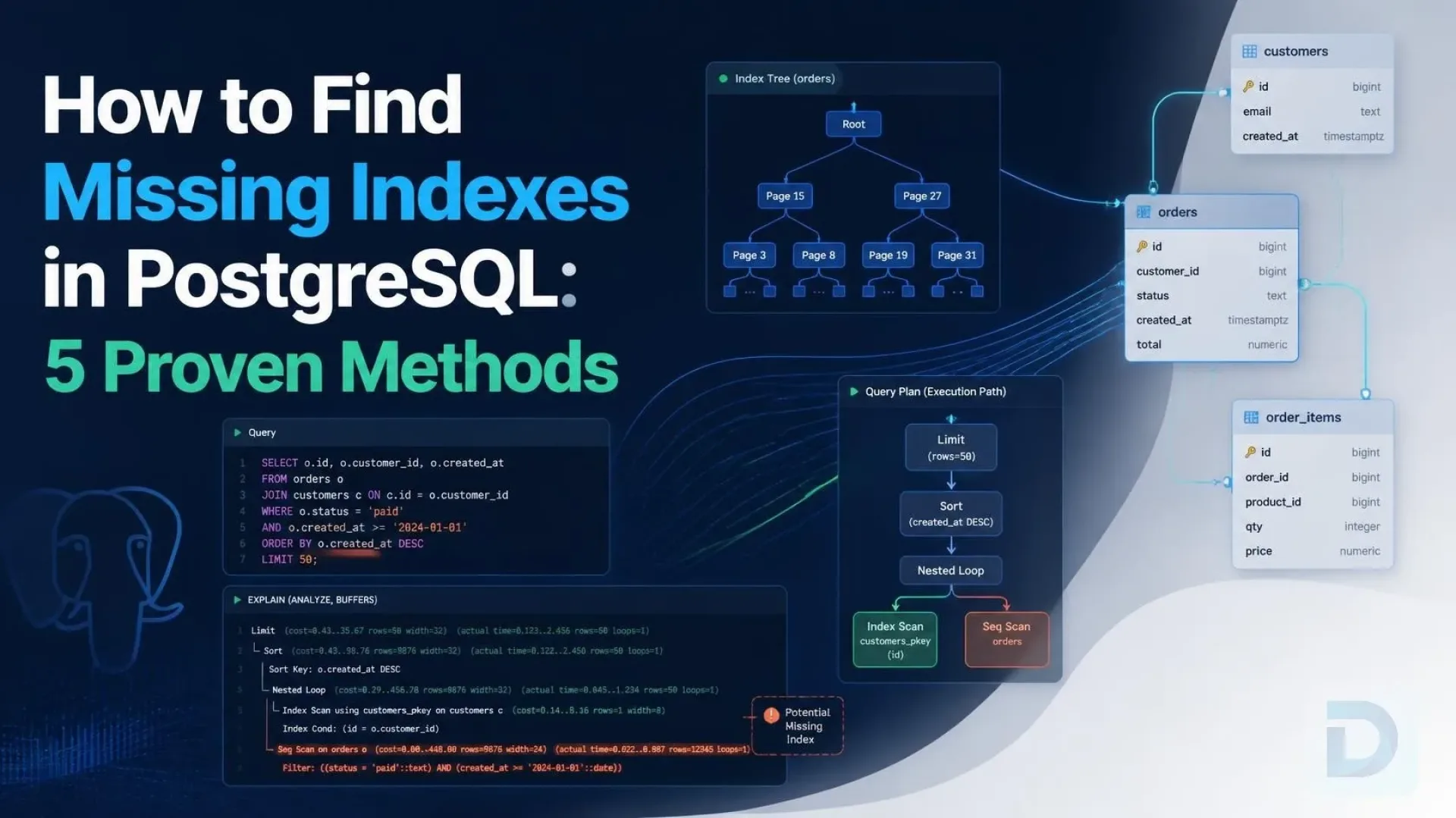
Statistics suggest; the execution plan proves. Run the suspect query with actual execution data:
EXPLAIN (ANALYZE, BUFFERS)
SELECT * FROM orders
WHERE customer_id = 12345
  AND status = 'pending';
Look for three things in the output:
Seq Scan on orders— the planner is reading the whole table despite a filter.Rows Removed by Filter: ...— a huge number here means most rows read were discarded, the classic signature of anEXPLAIN ANALYZEmissing index case.Buffers: shared read=...— high read counts mean real disk I/O, not just cheap memory scans.
A healthy plan instead shows an Index Scan or Bitmap Heap Scan with Rows Removed by Filter close to zero. For a deeper walkthrough of plan reading.
Method 4: Catch Missing Indexes Automatically from Logs
The first three methods catch problems you know to look for. The fourth catches what you cannot watch in real time — intermittent queries that only go slow under production data volumes.
Configuring auto_explain with log_nested_statements
auto_explain logs execution plans automatically for queries exceeding a duration threshold:
# postgresql.conf
shared_preload_libraries = 'auto_explain'
auto_explain.log_min_duration = '500ms'
auto_explain.log_analyze = on
auto_explain.log_buffers = on
auto_explain.log_nested_statements = on
log_nested_statements = on is essential for ORMs and stored procedures — it captures plans for the inner statements, not just the outer call.
Setting log_min_duration_statement thresholds
Independently of auto_explain, set log_min_duration_statement = '500ms' (tune the value to your SLO) to log the text of every slow query. That gives you the what, while auto_explain gives you the why.
Parsing logs at scale with pgBadger
On busy servers, raw logs are unusable by eye. pgBadger parses PostgreSQL logs into HTML reports with top-slowest queries and aggregated plan data, turning weeks of log noise into a ranked worklist. Run it on a schedule and you have continuous, hands-off PostgreSQL query performance tuning intelligence.
Creating the Right Index: A Decision Checklist
Diagnosis done — now build the fix. Follow PostgreSQL CREATE INDEX best practices so the index actually gets used:
- Order composite index columns by selectivity and usage. Put equality-filtered columns first, range/sort columns last. An index on
(customer_id, status)servesWHERE customer_id = ? AND status = ?andWHERE customer_id = ?, but not a query filtering only onstatus. - Match join keys, not just filters. Unindexed foreign-key columns used in joins are frequently missed.
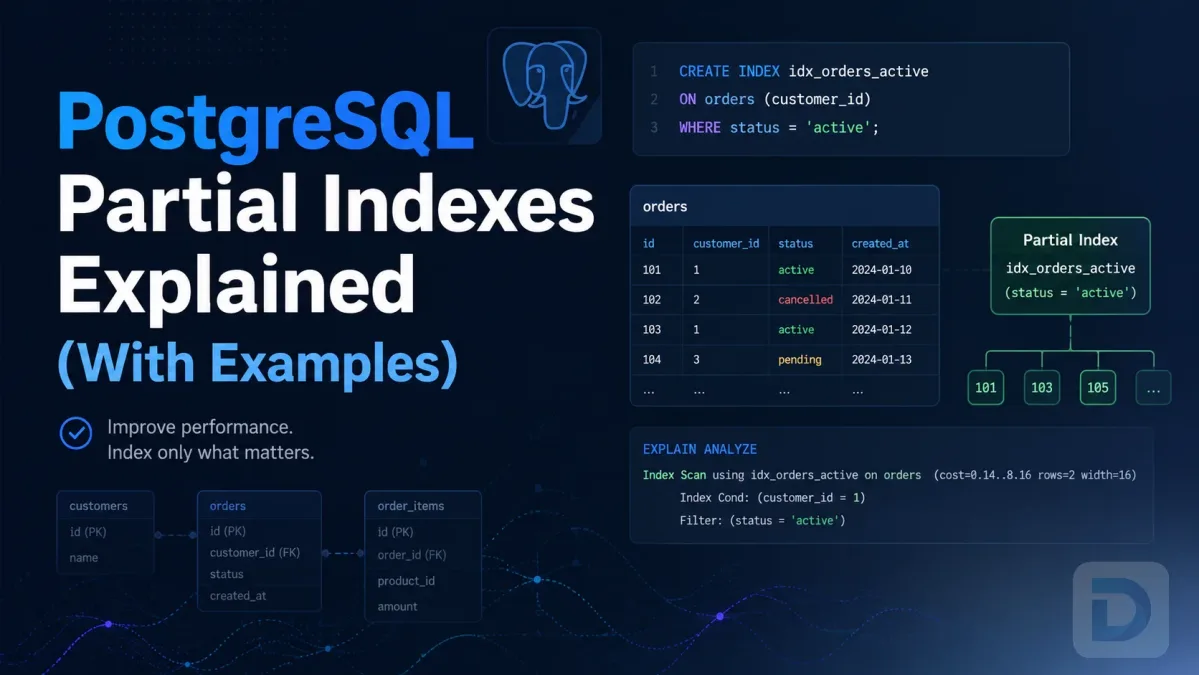
- Use a partial index for skewed predicates.
CREATE INDEX ... ON orders (created_at) WHERE status = 'pending';is tiny and fast when only one status value is hot. - Use
INCLUDEfor covering indexes. An index on(customer_id) INCLUDE (status)can satisfy queries via index-only scans, avoiding heap fetches — provided the pages are in the buffer cache or visibility map. - Use expression indexes for function predicates. If you query
lower(email), indexlower(email), notemail. - Respect write-amplification. Every index slows
INSERT,UPDATE, andDELETE, consumes cache, and can bloat over time. Create indexesCONCURRENTLYin production to avoid locking writes, and drop indexes with near-zeroidx_scanto make room. - Validate before and after. Capture the
EXPLAIN (ANALYZE, BUFFERS)plan before creating the index, create it, runANALYZEon the table, then re-run the identical plan comparison. Expect theSeq Scannode to become anIndex Scanand buffer reads to drop sharply.
Key Takeaways
- PostgreSQL has no built-in missing index advisor; you build the diagnosis from
pg_stat_user_tables,pg_stat_statements, andEXPLAIN (ANALYZE, BUFFERS). - High
seq_scanon a large table is a triage signal, not proof — cumulative counters need a clean baseline (reset or narrow time window). - Confirm every candidate with an actual execution plan:
Seq Scanplus highRows Removed by Filteris the smoking gun. - Use
auto_explainand pgBadger to catch intermittent slow queries that spot checks miss. - Design indexes deliberately — column order, partial and covering variants — and validate every index with a before/after plan comparison.
FAQ
Query pg_stat_user_tables for large tables with high seq_scan, use pg_stat_statements to identify the slowest queries touching them, and verify with EXPLAIN (ANALYZE, BUFFERS). All three are built into PostgreSQL or shipped as first-party extensions — no external tooling required.
No. SQL Server exposes missing index DMVs; PostgreSQL does not. The philosophy is that indexes carry write costs, so recommendations are left to the operator. The planner's own plan choices — visible via EXPLAIN and auto_explain — are the official signal.
There is no universal target. Large OLTP tables should show index scans dominating, while small lookup tables are legitimately seq-scanned. Judge the ratio per table alongside row count (n_live_tup) and the workload, not as a cluster-wide average.
Common causes: the predicate does not match the index's leading columns, a function or wildcard wraps the column, selectivity is too low for the index to pay off, the table is small, or statistics are stale. Run ANALYZE and re-examine the plan before concluding the planner is wrong.
Yes. Each index adds write overhead on every INSERT/UPDATE/DELETE, consumes buffer cache, and can bloat. Check idx_scan in pg_stat_user_indexes periodically and drop indexes that are never (or almost never) used.
You generally should not reset routinely. Reset once to start a fresh measurement window (for example, before a load test), let the workload run long enough to be representative, then analyze. Frequent resets destroy the long-term signal you need for spotting unused indexes.
No. If the table is small, the filter is unselective, or the scan is part of a bulk operation, a sequential scan is the optimal plan. Only add an index when the plan shows a large table being scanned with most rows removed by a filter, and when that query runs often enough to matter.
Conclusion
Finding missing indexes in PostgreSQL is not a mystery — it is a workflow. Start with pg_stat_user_tables to find scan-heavy tables, trace the offenders with pg_stat_statements, confirm with EXPLAIN (ANALYZE, BUFFERS), and automate capture with auto_explain and pgBadger so nothing slips through. Then index deliberately, measure before and after, and prune what you no longer use.
If you would rather browse pg_stat views and run EXPLAIN plans in a fast, native interface instead of psql, download DBO Studio — its PostgreSQL client and query editor are built exactly for this kind of diagnostic work. New features land regularly, so check the release notes to see what is current.
Further reading: the PostgreSQL statistics collector docs, pg_stat_statements reference, EXPLAIN documentation, indexes guide, and auto_explain module.
About the author

Founder & Lead Developer at DBO Studio
Full-stack developer and creator of DBO Studio, a modern database management tool. Passionate about PostgreSQL, MySQL, SQLite, database performance, developer productivity, and building tools that simplify database workflows.
Try this in DBO Studio
Explore PostgreSQL workflows visually in DBO Studio — schemas, queries, and plans in one place.
Our newsletter
Subscribe to DBO Studio’s newsletter for exclusive tutorials, tips & product updatesRelated posts