TL;DR
EXPLAIN prints the query plan the PostgreSQL planner chose — without running anything. Add ANALYZE to execute the statement and capture real timings, and BUFFERS to see cache usage. Read plans innermost-first, compare estimated vs. actual rows at each node, and most slow queries point to a missing index, stale statistics, or a memory spill.
Introduction
When a production query is slow, guessing costs more than measuring. The PostgreSQL EXPLAIN command shows you the execution plan the query planner built for your statement: which access paths it chose, how it will join tables, and how many rows it expects to touch. Once you can read that plan, you can diagnose problems instead of throwing indexes at the wall. This guide walks through reading PostgreSQL EXPLAIN output — cost, rows, width, and actual time — then covers the scan and join nodes you will see most often and the red flags that map directly to fixes. For the full workflow, pair it with our step-by-step guide to PostgreSQL query optimization.
What Is EXPLAIN and What Does It Show?

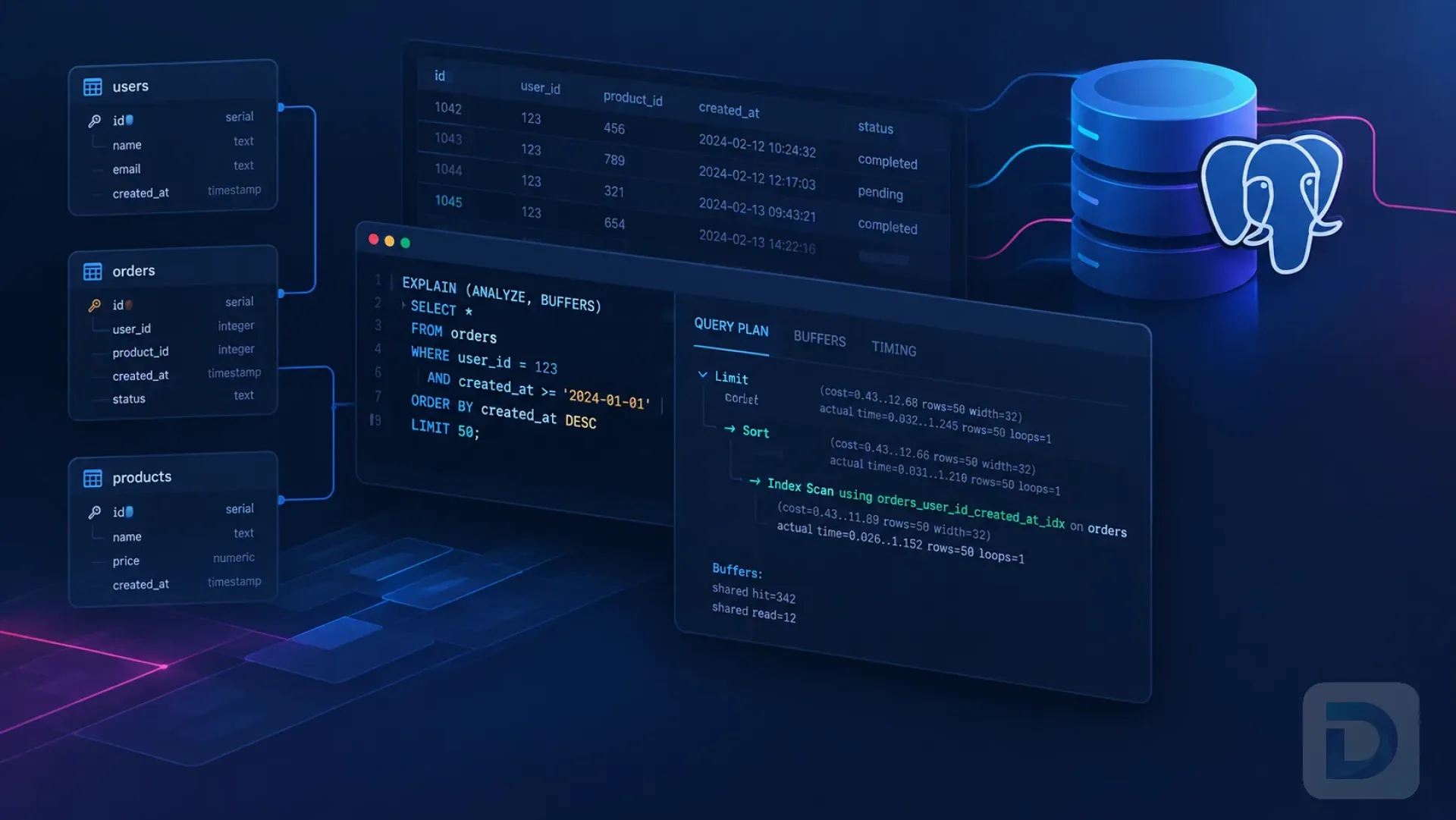
Anatomy of a PostgreSQL query plan: cost, rows, width, actual time, and loops
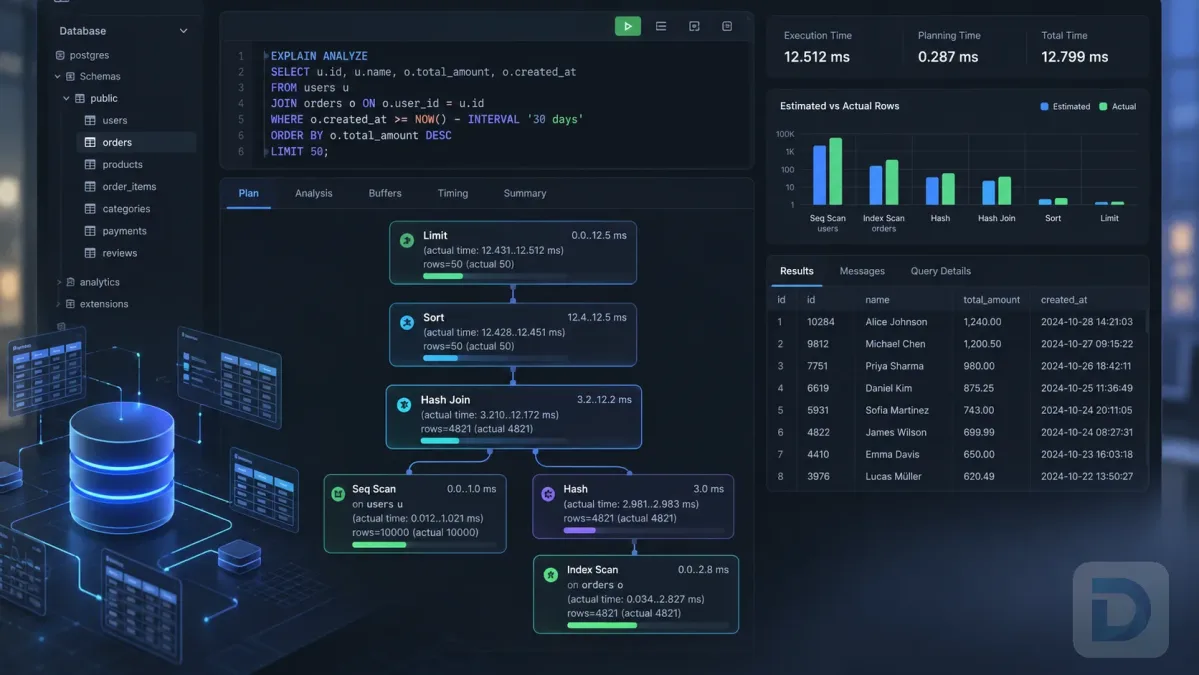
EXPLAIN accepts a SQL statement and returns the PostgreSQL query plan — the tree of operations the planner selected — without executing it. Each level of the tree is an input to the level above, so execution flows from the deepest indented nodes upward. Three variants cover most debugging sessions:
| Command | Executes? | What it adds |
|---|---|---|
EXPLAIN | No | Estimated plan: cost, rows, width |
EXPLAIN ANALYZE | Yes | Actual time, actual rows, loops, plus planning and execution time |
EXPLAIN (ANALYZE, BUFFERS) | Yes | Per-node buffer usage: shared hit, shared read, temp |
Two more options are handy: VERBOSE adds each node's output columns, and FORMAT JSON produces machine-readable output for tools and CI checks. The official EXPLAIN reference documents every option.
EXPLAIN vs EXPLAIN ANALYZE vs EXPLAIN (ANALYZE, BUFFERS)
Start with plain EXPLAIN: it is fast, side-effect free, and usually enough to spot a bad access path. Reach for EXPLAIN ANALYZE when estimates look sane but the query is still slow — only execution reveals where time actually goes. Add BUFFERS when you suspect I/O pressure. The manual's Using EXPLAIN chapter explains each node type in depth.
Is EXPLAIN safe to run in production?
Plain EXPLAIN is safe: the statement is planned but never executed, so no data changes and no user-defined functions run. EXPLAIN ANALYZE is a different story — it fully executes the statement, including UPDATE, DELETE, and any triggers, and its timing instrumentation adds slight per-node overhead, so measured times run a little high. A read-only SELECT is usually fine; handle data-modifying statements with the pattern below.
How to Read EXPLAIN Output: Cost, Rows, and Time
Cost estimation starts here: a typical plan for a filter with no supporting index looks like this (illustrative output):
EXPLAIN
SELECT * FROM orders
WHERE customer_id = 42
  AND status = 'shipped';

Seq Scan on orders  (cost=0.00..1943.00 rows=12 width=68)
  Filter: ((customer_id = 42) AND (status = 'shipped'::text))
Understanding cost=0.00..1943.00 rows=12 width=68
The numbers in parentheses answer three questions:
cost=0.00..1943.00— estimated work asstartup..total, in arbitrary units calibrated so that a sequential page read (seq_page_cost) equals 1.0. These are not milliseconds, and a parent's total already includes its children, so sibling costs cannot be summed.rows=12— the planner's estimate of how many rows this node emits.width=68— the average row size in bytes, which feeds memory estimates for sorts and hash tables.
actual time, loops, and actual rows
With EXPLAIN ANALYZE, each node reports actual time=startup..total in milliseconds, plus actual rows and loops. The critical detail: when loops > 1, both values are averages per loop. An inner index scan showing rows=1 loops=1000 returned roughly 1,000 rows in total and spent its actual time a thousand times over. Misreading loops is the fastest way to blame the wrong node. The plan footer also separates Planning Time from Execution Time — occasionally, especially with many partitions, planning is the expensive part.
Filter vs Index Cond
Index scans can report two kinds of predicates. Index Cond conditions were pushed into the index search itself — they selected entries directly in the index. Filter conditions are re-checked against each row after it is fetched from the heap. A Filter that discards a large share of fetched rows means the index located the rows but not the predicates — often fixed with a composite or expression index.
Scan and Join Nodes Explained

When the PostgreSQL planner chooses each scan type
Seq Scan, Index Scan, Index Only Scan, and Bitmap Heap Scan
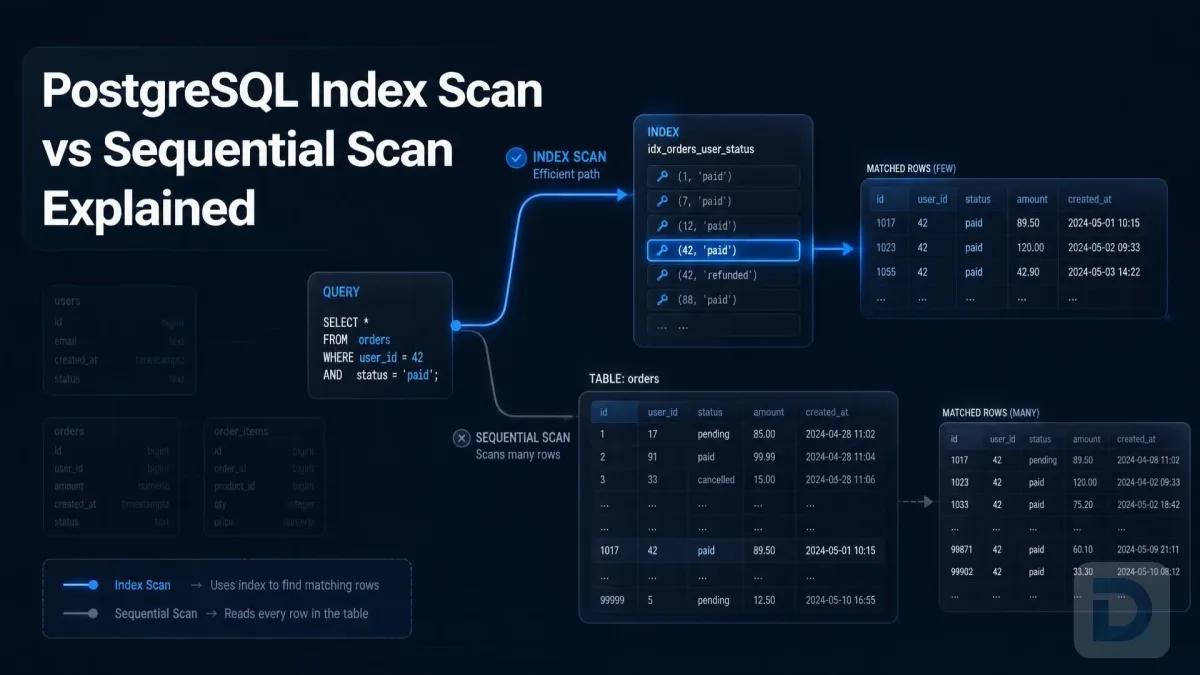
- Seq Scan — reads the entire table. Correct for small tables or queries returning a large fraction of rows; a red flag on a big table with a selective filter. The trade-offs are covered in detail in PostgreSQL index scan vs. sequential scan.
- Index Scan — walks an index, then fetches each matching row from the heap. Precise for a few rows; random I/O grows with the result size.
- Index Only Scan — answers from the index alone. Watch the
Heap Fetchescounter: high values mean it still visited the heap for row-visibility checks. - Bitmap Heap Scan — a child
Bitmap Index Scanbuilds a bitmap of matching row locations, then heap pages are visited once, in order — the middle ground for many scattered matches. If the bitmap exceedswork_mem, it degrades to "lossy" and aRecheck Condline re-checks each row.
Nested Loop, Hash Join, and Merge Join
- Nested Loop Join — probes the inner input once per outer row. Best when the outer side is small and the inner lookup uses an index; the inner node's
loops=shows how many probes ran. - Hash Join — builds an in-memory hash table from one input, then probes it with the other. The default for large, unsorted joins; building the table is bounded by
work_mem. - Merge Join — consumes both inputs in sorted order. Efficient for large inputs when indexes already provide the ordering; otherwise the planner pays for sorts up front.
Using EXPLAIN ANALYZE and BUFFERS to Verify Plans
Running EXPLAIN ANALYZE safely on UPDATE and DELETE with BEGIN/ROLLBACK
EXPLAIN ANALYZE on a data-modifying statement really modifies data. Wrap it in a transaction you roll back:
BEGIN;
EXPLAIN ANALYZE
DELETE FROM sessions
WHERE expires_at < now();
ROLLBACK;
Rollback discards every change and trigger effect, but the statement still runs to completion and takes the same locks — keep the transaction brief and avoid peak hours on a busy primary.
Reading Buffers: shared hit vs shared read
Running EXPLAIN (ANALYZE, BUFFERS) shows where each node's pages came from:
shared hit— the page was already in PostgreSQL's shared buffer cache. Effectively free.shared read— the page was not in shared buffers and had to be read in. This may still be served by the OS cache, so "read" is not guaranteed physical disk I/O.temp read/written— spill files created by sorts or hash tables that exceededwork_mem.
A plan dominated by shared read on a hot table means the working set does not fit in cache — useful evidence when sizing shared_buffers or trimming the data your queries touch.
Sort memory: quicksort vs external merge sort
Check the Sort Method line in sort nodes. quicksort Memory: ... means the sort fit in memory, and top-N heapsort Memory: ... is the in-memory variant used with LIMIT. Sort Method: external merge Disk: ... is an external merge sort that spilled to disk — raising work_mem for the session is often the cheapest win available.
Common EXPLAIN Red Flags and How to Fix Them
Estimated rows wildly different from actual rows
Wrong row estimates are the most common root cause of bad plans. When rows=1 hides thousands of actual rows, the PostgreSQL query planner is navigating blind: estimates come from statistics collected by ANALYZE and maintained by autovacuum, and they go stale after large loads. Run ANALYZE tablename; to refresh. If estimates stay wrong because two columns are correlated (say city and postal_code), create extended statistics so the planner can model the dependency.
Seq Scan on a large filtered table
A Seq Scan over a big table with a selective WHERE clause means the index is missing or unusable. The usual culprits: wrapping the column in a function (lower(email) = ... needs an expression index), implicit type casts, and leading-wildcard LIKE patterns. For systematic detection, see our guide on how to find missing indexes in PostgreSQL.
Stale statistics and unexpected plan changes
Plans legitimately flip between index scans and Seq Scans as data volumes cross the thresholds encoded in the planner's cost parameters, such as random_page_cost. Defaults assume spinning disks; teams on SSDs commonly lower random_page_cost to favor index scans — test the change against your workload instead of copying values blindly. And if a plan changed right after a bulk load, run ANALYZE before assuming the planner is wrong.
Key Takeaways
- Plain
EXPLAINnever executes your statement;EXPLAIN ANALYZEdoes — wrap DML inBEGIN/ROLLBACK. - Read plans deepest-node-first; a parent's cost includes its children.
actual timeand actualrowsare per-loop averages — multiply byloopsfor node totals.- Large estimated-vs-actual row gaps usually mean stale or missing statistics.
external mergesorts and heavyshared readcounts are the cheapest problems to fix.
Conclusion
The PostgreSQL EXPLAIN command turns query tuning from folklore into measurement: plan first with EXPLAIN, verify with EXPLAIN ANALYZE, and chase estimated-vs-actual gaps to their root cause. Keep the supporting pieces healthy — design indexes deliberately (see the PostgreSQL indexing guide) and prune dead weight by learning to find unused indexes in PostgreSQL. And if you want query plans, schema, and live data side by side while you tune, download DBO Studio.
FAQ
EXPLAIN shows the plan without executing the statement — estimates only. EXPLAIN ANALYZE executes it and adds actual time, actual rows, loops, plus planning and execution time.
Yes. Triggers fire and side effects are real; INSERT, UPDATE, and DELETE change data unless you wrap the call in a transaction and roll back.
Estimates come from statistics, not live data. They drift after bulk changes and mislead when predicates involve correlated columns. Run ANALYZE and add extended statistics where needed.
It is an abstract measure of estimated work, not milliseconds: startup..total in units where a sequential page read costs 1.0. Compare costs only within the same server configuration.
Use BEGIN; → EXPLAIN ANALYZE ...; → ROLLBACK;. The statement executes fully, including locks and triggers, but every change is discarded on rollback.
About the author

Founder & Lead Developer at DBO Studio
Full-stack developer and creator of DBO Studio, a modern database management tool. Passionate about PostgreSQL, MySQL, SQLite, database performance, developer productivity, and building tools that simplify database workflows.
Try this in DBO Studio
Explore PostgreSQL workflows visually in DBO Studio — schemas, queries, and plans in one place.
Our newsletter
Subscribe to DBO Studio’s newsletter for exclusive tutorials, tips & product updatesRelated posts