TL;DR
Good MySQL indexing comes down to a handful of habits: index the columns you filter, join, and sort on; order composite index columns as equality first, range last; aim for covering indexes on hot queries; verify everything with EXPLAIN; and prune unused or redundant indexes regularly — every index you add taxes every write.
Introduction
Most slow MySQL queries are not slow because of hardware. They are slow because the optimizer is reading far more rows than necessary — usually because no suitable index exists, or because the wrong one is being used. Following solid MySQL indexing best practices is the highest-leverage tuning work you can do: a well-chosen index can turn a full table scan over millions of rows into a handful of B-tree lookups.
This guide covers how MySQL indexes actually work under InnoDB, how to design composite and covering indexes, how to verify index usage with EXPLAIN, and the mistakes that quietly degrade performance. If you need the storage-engine context first, our deep dives into MySQL InnoDB architecture and MySQL's overall architecture pair well with this article.
How MySQL Indexes Work Under the Hood
Almost every index in MySQL is a B-tree index — a balanced tree that keeps keys sorted and lets the engine find any value in a small, logarithmic number of page reads. B-trees support equality lookups, range scans (BETWEEN, >, LIKE 'abc%'), ORDER BY on indexed columns, and MIN()/MAX() efficiently, which is why they are the default everywhere in MySQL.
InnoDB clustered vs secondary indexes
InnoDB's index structure has a twist that matters for design decisions: it is index-organized.
- The clustered index is the table. InnoDB stores the actual rows in the leaf pages of the B-tree built on the primary key. This is why choosing a short, monotonically increasing primary key matters — every secondary index entry references it.
- A secondary index (any index other than the primary key) stores the indexed columns plus the primary key value in its leaf pages. To fetch columns not in the index, InnoDB does a second lookup into the clustered index — a bookmark lookup, in relational terminology.
Two practical consequences:
- Wide primary keys inflate every secondary index, because the key is copied into all of them.
- Random (e.g., UUID) primary keys cause page splits and fragmentation on inserts, while auto-increment keys append sequentially. For most tables, an auto-increment
BIGINTprimary key is the safe default.
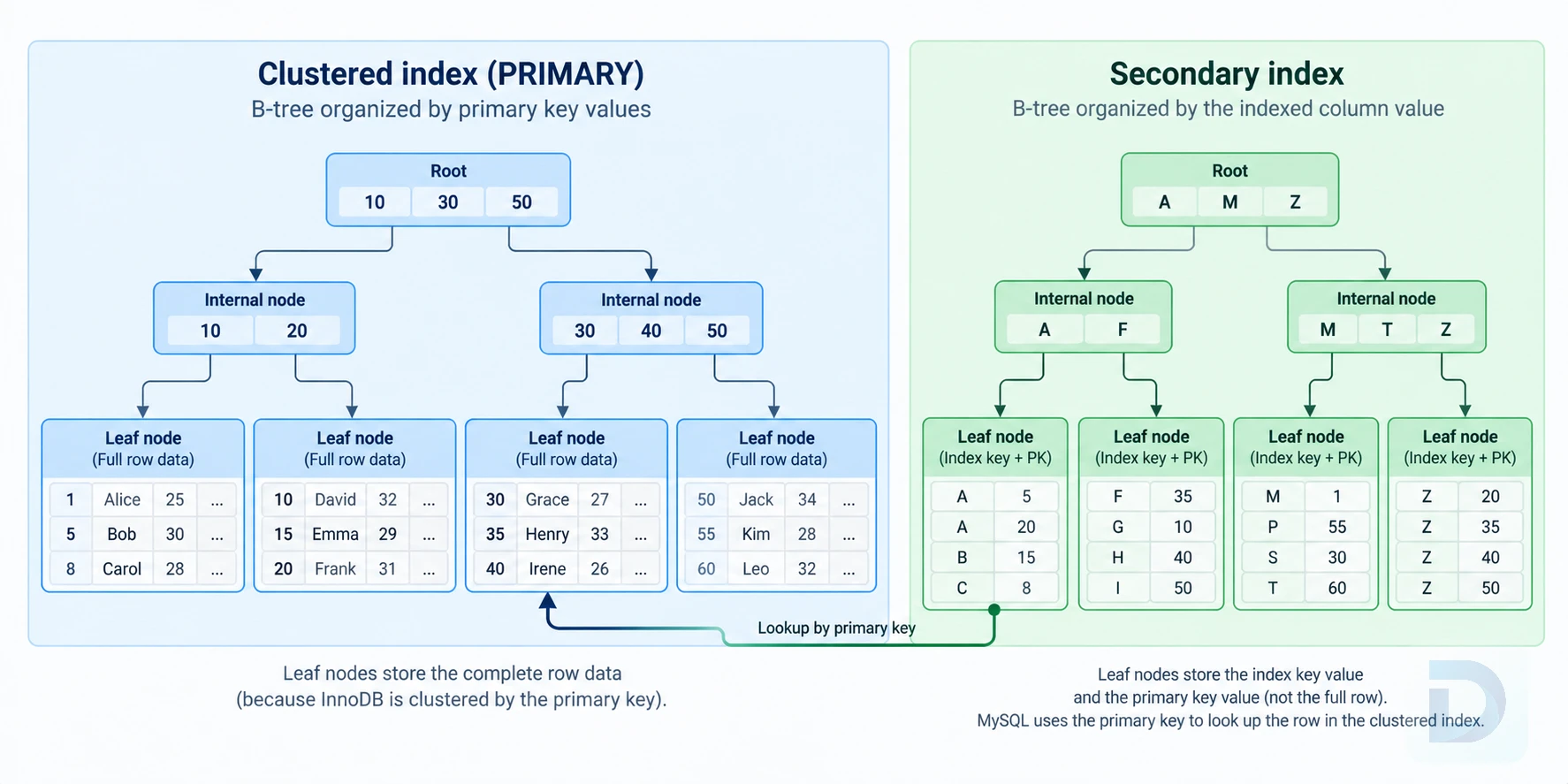
InnoDB: the clustered index stores full rows in its leaf pages; secondary indexes store keys plus a primary key pointer.
Why B-Tree dominates in MySQL
InnoDB historically offered no user-visible hash indexes (its internal adaptive hash index is automatic and not something you configure per column). The MEMORY engine supports HASH indexes, but that engine is not suitable for durable production data. For practical purposes: you design for B-trees, and B-tree properties — sorted keys, prefix usability, range support — drive the best practices below.
Choosing the Right Index Type
MySQL supports several index types, and picking the right one is the first step in index optimization.
PRIMARY, UNIQUE, and regular indexes
| Index type | Purpose | Notes |
|---|---|---|
PRIMARY KEY | Uniquely identifies each row; defines the clustered index in InnoDB | One per table; keep it narrow and monotonic when possible |
UNIQUE | Enforces uniqueness while speeding up lookups | Doubles as a constraint; use for natural keys like email |
Regular (INDEX/KEY) | Accelerates filters, joins, sorts | The workhorse; design composite keys deliberately |
FULLTEXT | Natural-language and boolean text search | InnoDB and MyISAM; not a replacement for relevance-tuned search engines |
| Spatial | Geometric data types | R-tree based |
Full-text and prefix indexes
Use a FULLTEXT index when you need keyword search over text (MATCH ... AGAINST). For very long VARCHAR/TEXT columns where you still want a B-tree, use a prefix index — index only the first N characters:
CREATE INDEX idx_email_prefix ON users (email(20));
Choose the prefix length by testing selectivity: find the smallest prefix that keeps cardinality close to the full column. Note the trade-off — a prefix index cannot fully cover a query, because the complete value is not stored in the index, so InnoDB must go back to the row.
Composite Indexes and the Leftmost Prefix Rule
A MySQL composite index indexes multiple columns in one structure: INDEX idx_orders (customer_id, status, created_at). Think of it like a phone book sorted by last name, then first name — you can find people efficiently by last name, or last name plus first name, but not by first name alone.
That's the leftmost prefix rule: a query can use the index only if it filters or sorts on a contiguous prefix starting from the first column.
Column order matters
For an index on (a, b, c):
| Query predicate | Can use the index? | Why |
|---|---|---|
WHERE a = ? | ✅ | Matches prefix (a) |
WHERE a = ? AND b = ? | ✅ | Matches prefix (a, b) |
WHERE a = ? AND b = ? AND c = ? | ✅ | Full key |
WHERE b = ? | ❌ | a is skipped — no leftmost prefix |
WHERE a = ? AND c = ? | ⚠️ | Uses only (a); c is not seekable |
WHERE a = ? ORDER BY b | ✅ | Sort satisfied by index order |
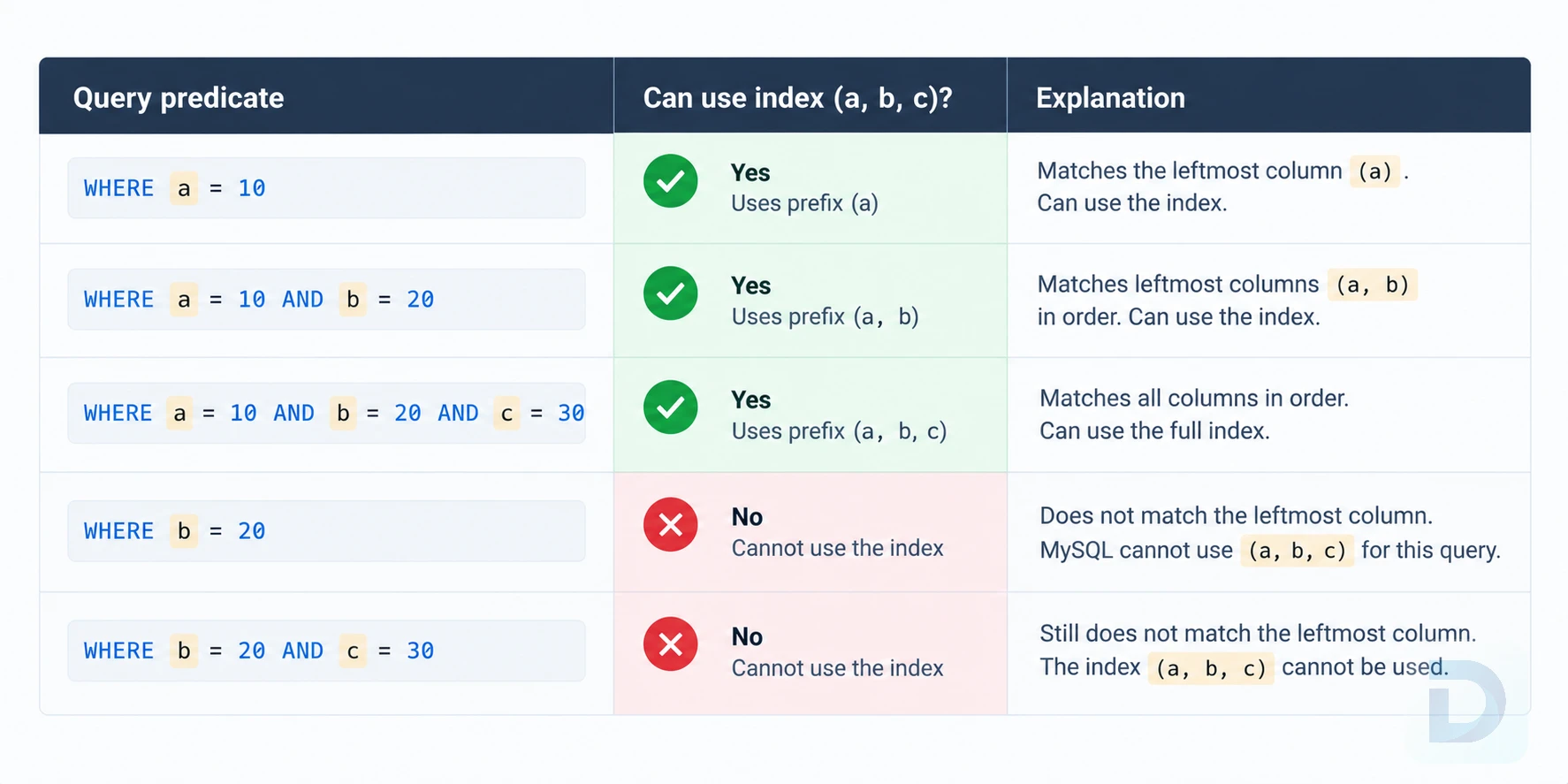
Which queries can use an index on (a, b, c): any leftmost prefix works; skipping a loses the index.
So design composite indexes around your actual query workload, and remember the composite index serves every leftmost prefix — idx (customer_id, status, created_at) also covers queries filtering only on customer_id, which is why you rarely need a separate single-column index on the first column.
Equality first, range last
Columns used with = should come before columns used with range operators (<, >, BETWEEN, LIKE 'prefix%'). Once the optimizer hits a range condition, subsequent columns in the index can no longer be used to seek — only to filter within the already-narrowed range.
-- Good: equality columns first, range last
CREATE INDEX idx_orders_lookup (customer_id, status, created_at);

SELECT * FROM orders
WHERE customer_id = 42
  AND status = 'shipped'
  AND created_at >= '2024-01-01';

-- Poor ordering: created_at in the middle cuts off 'status'
CREATE INDEX idx_orders_bad (customer_id, created_at, status);
In the second version, the optimizer can seek on (customer_id, created_at) but must read and filter on status row by row — scanning far more entries than necessary.
Covering Indexes for Index-Only Scans
Because InnoDB secondary-index leaves contain the primary key, adding the few extra columns a query needs can create a MySQL covering index — an index that answers the entire query without touching the table. This avoids the bookmark lookup entirely and is one of the biggest wins available in index optimization.
CREATE INDEX idx_orders_cover (customer_id, status, order_date, total);

-- Answered entirely from the index:
SELECT order_date, total
FROM orders
WHERE customer_id = 42
  AND status = 'pending';
Covering indexes are especially valuable when the table rows are wide, the working set doesn't fit in the buffer pool, and the query runs constantly. Don't blanket-apply them, though: every column you add grows the index and its write cost.
Reading Using index in EXPLAIN
In EXPLAIN output, a covering index shows up as Using index in the Extra column — that phrase means index-only access, not merely "an index was used." If you also see Using where, the optimizer is applying filters after the index scan; combined with a large rows estimate, that's a hint the index could be better designed.
Verifying Index Usage with EXPLAIN
Never trust an index on faith. Prepend EXPLAIN (or run EXPLAIN ANALYZE in MySQL 8.0.18+, which executes the query and reports actual row counts and timing) and inspect the execution plan.
Key EXPLAIN columns to check
- type: the access type. Aim for
const,eq_ref,ref, orrange.indexmeans a full index scan;ALLmeans a full table scan. - key: which index the optimizer actually chose.
- key_len: how much of a composite index was used — a quick way to confirm prefix usage.
- rows: estimated rows examined. Compare it to the result set size; a huge ratio means poor selectivity or a bad plan.
- Extra: watch for
Using index(covering — good),Using filesort(sort not satisfied by the index), andUsing temporary(often a sign of a missing index forGROUP BY/DISTINCT).
For a full walkthrough of plan reading, see our guide to understanding the SQL WHERE clause and how predicates shape index use.
When the optimizer ignores your index
The optimizer can cost out an index and rationally reject it. Common reasons:
- Low selectivity: if a predicate matches 30% of the table, reading the index plus random row lookups costs more than a sequential scan.
- Type mismatches: comparing a string column to a number (e.g.,
WHERE varchar_col = 42) prevents index use. Match types explicitly. - Stale statistics: run
ANALYZE TABLEafter bulk loads so cardinality estimates reflect reality. - Leading wildcards:
LIKE '%term'cannot use a B-tree seek. - Functions on the indexed column: see below.
Common Indexing Mistakes to Avoid
Indexing low-selectivity columns
Index selectivity is the ratio of distinct values to total rows. A BOOLEAN or status column with three values has terrible selectivity on its own; a query on it reads a huge slice of the index for little benefit. Low-selectivity columns still earn their place as later columns in composite indexes led by selective equality predicates — just not as standalone indexes on large tables.
Functions and leading wildcards breaking indexes
Wrapping an indexed column in a function or expression makes the predicate non-sargable — the B-tree order can't be used:
-- Cannot use an index on created_at
SELECT * FROM orders WHERE YEAR(created_at) = 2024;

-- Index-friendly rewrite (MySQL 8.0 can also use a functional index)
SELECT * FROM orders
WHERE created_at >= '2024-01-01' AND created_at < '2025-01-01';
Similarly, LIKE '%abc' disables the seek; LIKE 'abc%' works fine. If you truly need substring or trailing-wildcard search, a FULLTEXT index or a dedicated search solution is the better tool.
Too many or redundant indexes
Every index adds write amplification: each INSERT, UPDATE, or DELETE must update every affected B-tree, and every index competes for buffer pool space. Redundant indexes in MySQL are a frequent find in audits — for example, INDEX (email) alongside INDEX (email, status). The second makes the first unnecessary; keeping both doubles the write cost for zero read benefit.
A quick audit with sys:
-- Duplicate/redundant index candidates
SELECT * FROM sys.schema_redundant_indexes;

-- Unused index candidates (needs a representative uptime window)
SELECT * FROM sys.schema_unused_indexes;
Before dropping anything, confirm the query workload has been running long enough for performance_schema statistics to be meaningful, and remember that UPDATEs to indexed columns count as index usage.
Maintaining and Auditing Your Indexes
Indexing is not a one-time design task. Workloads change, and indexes accumulate.
Finding unused and duplicate indexes
Make index review a routine:
- Start from the slow query log to find queries that scan too many rows.
- Check each offender's plan with
EXPLAINand design a targeted composite index (equality → range, covering where cheap). - Use
sys.schema_unused_indexesandsys.schema_redundant_indexesto prune what's no longer earning its cost.
MySQL 8.0 also supports invisible indexes — ALTER TABLE t ALTER INDEX idx INVISIBLE — which the optimizer ignores without dropping. This is a safe way to test whether an index is truly unused before removing it.
Index impact on write performance
Benchmark write-heavy tables before and after adding indexes, and be deliberate on hot tables: high-churn columns in many indexes mean constant B-tree maintenance. On large tables, adding an index uses an online DDL algorithm in modern MySQL, but it still consumes I/O and time — plan maintenance windows for very large tables.
Key Takeaways
- Index the columns you filter, join, and sort on; let the slow query log drive priorities.
- In composite indexes: equality columns first, range last, and rely on the leftmost prefix rule so one index serves several queries.
- Build covering indexes for hot read paths and confirm with
Using indexinEXPLAIN. - Keep predicates sargable: no functions on indexed columns, no leading wildcards, matched data types.
- Audit for unused and redundant indexes; every extra index taxes every write.
- In InnoDB, keep the primary key narrow and monotonic — it's replicated in every secondary index.
Conclusion
MySQL indexing best practices boil down to deliberate design and constant verification. Understand the InnoDB index structure you're building on, order composite index columns to match real query patterns, exploit covering indexes where they pay off, and let EXPLAIN — not intuition — confirm the result. Just as important is subtraction: dropping unused and redundant indexes often improves write throughput as much as adding a good index improves reads. If you work across multiple engines, our PostgreSQL indexing guide covers how similar principles apply there — and if you want to inspect indexes, rows, and query plans across databases in one tool, download DBO Studio.
FAQ
There is no fixed number, but each additional index slows down INSERT, UPDATE, and DELETE operations. Keep indexes that serve real query patterns, drop unused and redundant ones, and audit regularly with performance_schema and the sys schema.
Yes. MySQL can only use a composite index if the query filters or sorts on a leftmost prefix of the indexed columns. Put equality-filtered columns first and range-filtered columns last.
Common causes: applying a function to the indexed column, using a leading wildcard in LIKE, low selectivity that makes a full scan cheaper, mismatched data types, or stale statistics. Check the EXPLAIN output to confirm the access path.
Yes. Every INSERT, UPDATE, or DELETE on indexed columns must also update each affected B-tree, which adds write overhead and consumes buffer pool space. Index only what your queries actually need.
- How MySQL Uses Indexes — MySQL Reference Manual
- InnoDB Index Structures — clustered and secondary indexes explained
- EXPLAIN Output Format — every column and
Extravalue decoded - Optimizing Indexes — index optimization techniques
About the author

Founder & Lead Developer at DBO Studio
Full-stack developer and creator of DBO Studio, a modern database management tool. Passionate about PostgreSQL, MySQL, SQLite, database performance, developer productivity, and building tools that simplify database workflows.
Try this in DBO Studio
Explore MySQL workflows visually in DBO Studio — schemas, queries, and plans in one place.
Our newsletter
Subscribe to DBO Studio’s newsletter for exclusive tutorials, tips & product updatesRelated posts