TL;DR
PostgreSQL indexes are not copies of your data; they are separate B-Tree structures that store sorted keys pointing to physical heap locations (CTIDs) via an 8KB page architecture. Understanding this mapping is the foundation of database query optimization.
Understanding PostgreSQL index internals is essential for diagnosing slow queries and designing high-performance schemas. While most developers treat indexes as a magic black box that makes queries faster, looking under the hood reveals a highly structured system built on top of PostgreSQL's underlying heap storage. By grasping how postgresql indexes work under the hood, you can make better decisions regarding indexing strategies, vacuuming, and hardware utilization.
The PostgreSQL Storage Model: Heaps and Pages
To understand how an index functions, you must first understand where the actual data lives. PostgreSQL uses a heap architecture. When you insert a row, PostgreSQL writes it to the first available space in a data file. This is known as a heap tuple. The data is not stored in sorted order.
The storage is divided into fixed-size blocks, typically 8KB. Understanding the PostgreSQL page layout is crucial because both heaps and indexes use this exact same block size. Each 8KB page contains a page header, item pointers (which act as an internal array mapping to the actual tuple offsets on the page), and free space.
Because the heap is inherently unordered, finding a specific row without an index requires a sequential scan—reading every page in the table from start to finish. This is where the index comes in, providing an ordered roadmap to the unordered heap.
Anatomy of a B-Tree Index
When looking at postgres index types explained, the default and most common type is the B-Tree (Balanced Tree). While PostgreSQL supports GIN, GiST, BRIN, and Hash indexes for specialized data types and queries, the B-Tree is the standard workhorse for handling equality and range queries on scalar types.

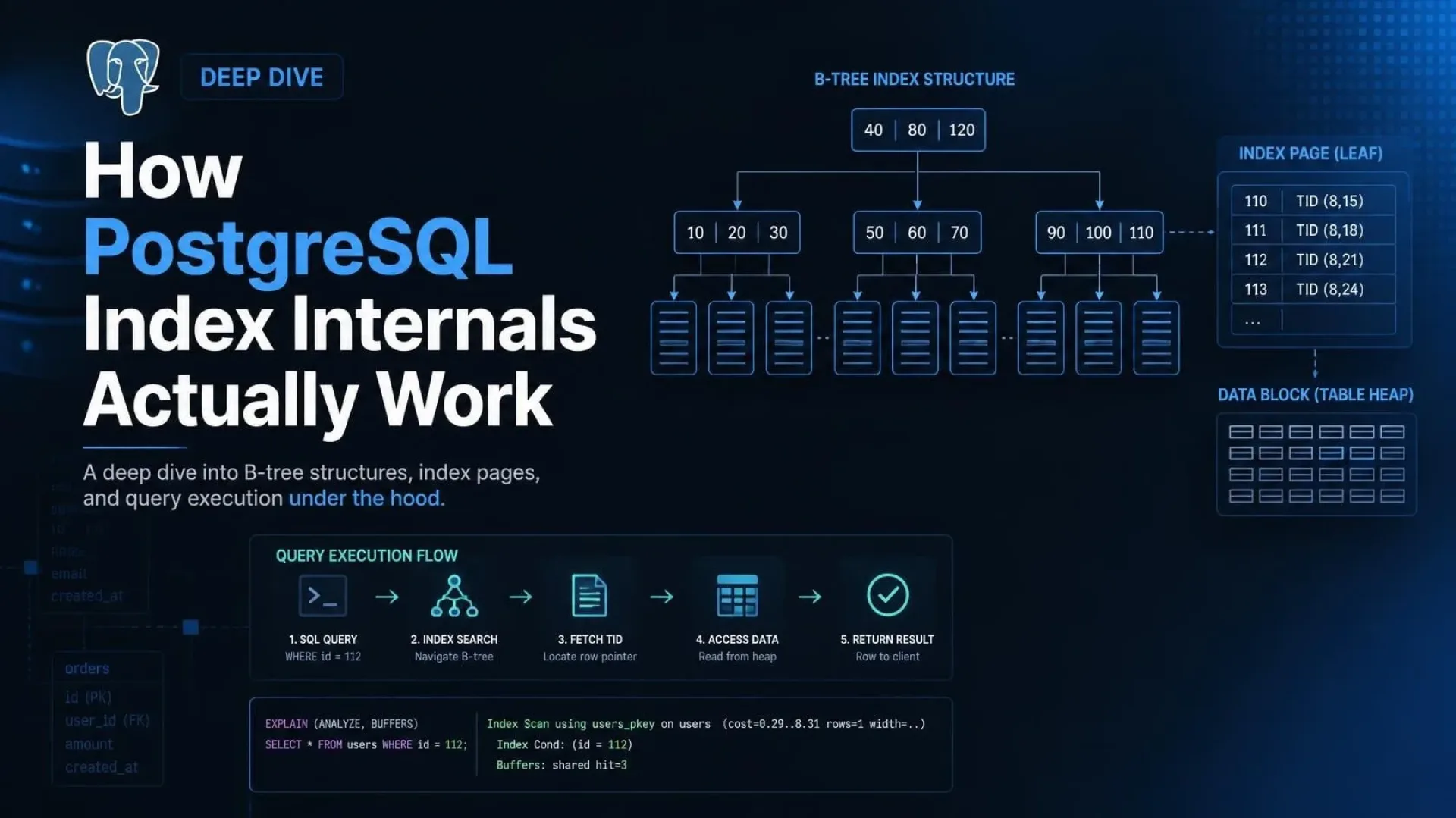
Hierarchical structure of a PostgreSQL B-Tree index showing root, internal, and leaf nodes pointing to heap tuples via CTIDs.
Root, Internal, and Leaf Nodes
A PostgreSQL B-tree structure is a self-balancing tree. It consists of three distinct layers:
- Root Node: The single entry point at the top of the tree.
- Internal Nodes: Intermediate nodes that route the search downward by comparing key values.
- Leaf Nodes: The bottom layer of the tree, which contains the actual indexed keys and the pointers to the heap tuples.
The tree remains balanced because insertions and deletions trigger page splits and merges. This guarantees that the path from the root to any leaf node is always the exact same length, ensuring consistent O(log N) lookup times regardless of which row you are querying.
Index Page Layout
Like heap pages, index pages are strictly 8KB in size. However, their internal layout is heavily optimized for rapid traversal. PostgreSQL uses a variant of the Lehman-Yao high-concurrency B-Tree algorithm, which allows index page splits to occur without locking the entire tree.
An index page contains:
- Page Header Data: Information about the page type, current block number, and pointers to the left and right sibling leaf pages.
- High Key: An upper bound for the keys stored on this specific page, used to route searches during tree traversal.
- Index Tuples: The actual key values and their corresponding heap pointers.
Crucially, leaf nodes are linked together in a doubly-linked list. This design is what makes range queries highly efficient—once the planner finds the starting point, it can simply scan horizontally through the leaf nodes without returning to the root.
The Connection: CTIDs and Heap Tuples
A fundamental concept in postgresql heap and index mapping is the ctid. The ctid is a hidden system column representing the physical location of a row, formatted as (block_number, item_offset).
When you create a standard B-Tree index, PostgreSQL does not copy the row data into the index. Instead, the leaf node stores the indexed key value alongside the row's ctid. When the query planner uses the index, it traverses the tree, finds the matching key, extracts the ctid, and uses it to fetch the actual row directly from the correct 8KB heap page.
Because the ctid is a physical pointer, if a row is updated and the new version cannot fit in the same page, the ctid changes. This physical coupling between the index and the heap is why PostgreSQL indexes store the physical address rather than a logical primary key by default—it is smaller, faster to traverse, and requires less storage overhead.
How Index Scans Operate
Depending on the query predicates and the estimated cardinality, the planner will choose one of three primary scan types to interact with the index.
Index Scan
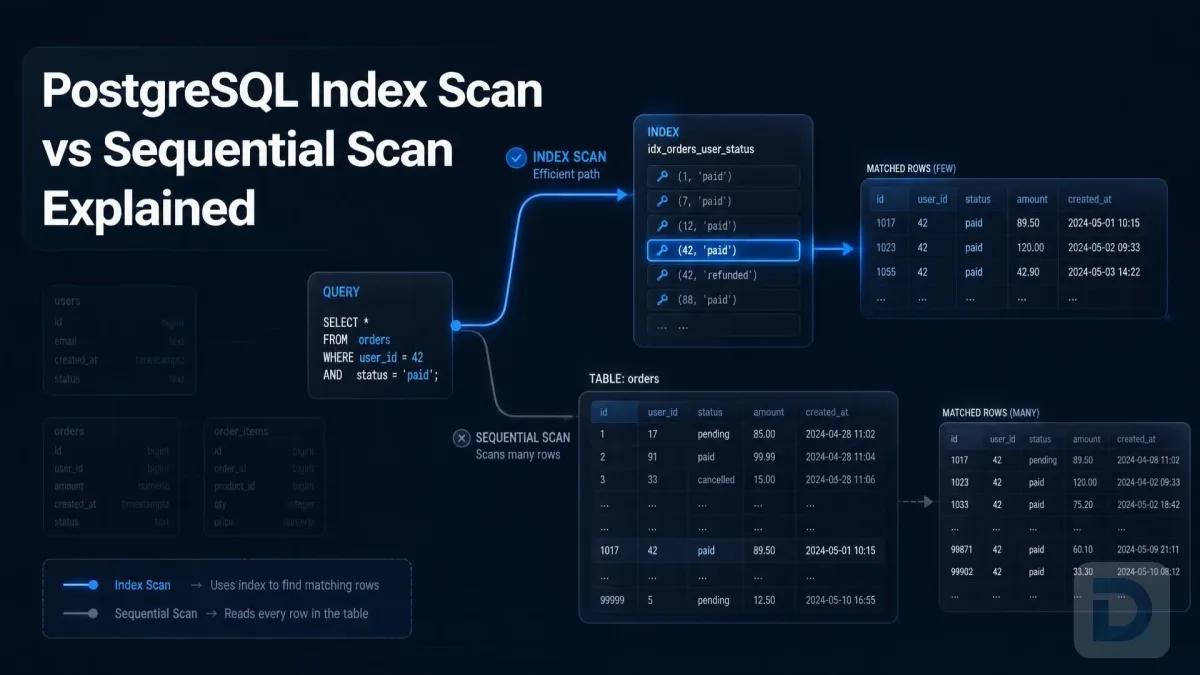
In a standard Index Scan, PostgreSQL traverses the B-Tree to find the first matching leaf node. It reads the ctid, jumps to the heap page, retrieves the row, and checks its visibility to the current transaction. It then moves to the next item in the leaf node and repeats the process. This involves random I/O, as the database jumps back and forth between the index and the heap.
Bitmap Heap Scan
If the planner estimates that an Index Scan would result in too much random I/O (for example, when retrieving 5-10% of a large table), it opts for a Bitmap Heap Scan. Instead of immediately fetching heap tuples, PostgreSQL scans the index and builds a bitmap in shared buffers representing the target heap pages. It then sorts the page numbers and fetches the rows page-by-page. This transforms expensive random I/O into highly efficient sequential I/O.
Index-Only Scan
If all the columns requested in the SELECT statement are present in the index itself (achieved via a covering index), PostgreSQL can perform an Index-Only Scan. It reads the leaf nodes and returns the data directly without accessing the heap at all. This is incredibly fast, though PostgreSQL must still consult the visibility map to ensure the referenced heap tuples have not been modified by concurrent transactions.
MVCC Impact on Indexes
PostgreSQL's Multiversion Concurrency Control (MVCC) heavily influences how indexes behave. The interaction between postgresql mvcc and indexes often surprises developers migrating from other database systems.
Dead Tuples and Visibility
When you UPDATE a row in PostgreSQL, it does not modify the existing data in place. Instead, it inserts a completely new tuple into the heap and marks the old one as expired (a "dead tuple"). The index is also updated: the new ctid is inserted into the index leaf, but the old ctid pointing to the dead tuple is left behind.
When an Index Scan encounters the old ctid, it fetches the heap tuple, sees that it is dead, discards it, and moves on. PostgreSQL does not remove the dead entry from the index immediately, as doing so would block concurrent read operations.
The Role of Vacuum
Because dead ctid entries accumulate over time, proactive postgresql index maintenance is required to keep the tree efficient. The autovacuum daemon is responsible for scanning the heap, identifying dead tuples, and then cleaning up the corresponding entries in the B-Tree.
If vacuuming is delayed, the index suffers from bloat—empty space occupied by pointers to dead tuples. Bloat degrades cache efficiency and slows down scans because PostgreSQL has to read through more index pages to find live data. Setting an appropriate fillfactor on highly updated tables (leaving free space on index pages for future inserts) can help mitigate page splits and reduce bloat over time.
FAQ
No, by default, a standard B-Tree index only stores the indexed column values and a physical pointer (ctid) to the heap tuple. However, an Index-Only Scan can return data directly from the index if all queried columns are included in the index definition.
Because of MVCC, an update creates a new heap tuple. PostgreSQL inserts a new entry (with the new ctid) into the index leaf node. The old index entry pointing to the expired heap tuple is left in place until the VACUUM process cleans it up.
Index bloat occurs primarily because of MVCC. Updates and deletes leave behind dead index entries pointing to dead heap tuples. If autovacuum does not run frequently enough, or if long-running transactions prevent cleanup, these dead entries accumulate, increasing the index size without adding useful data.
Yes. If a query retrieves a large percentage of the table's rows, or if the table is very small, the random I/O overhead of jumping between the index and the heap pages makes an index scan much slower than simply reading the entire table sequentially.
Key Takeaways
- PostgreSQL uses an unordered heap architecture; indexes provide an ordered map to this heap via
ctidpointers. - The default B-Tree index stores keys and physical locations, not the actual row data.
- Index pages are 8KB and linked at the leaf level to enable fast, sequential range queries.
- Query planners choose between Index Scans (random I/O), Bitmap Heap Scans (sequential I/O), and Index-Only Scans (no heap access).
- MVCC means updates result in new index entries, leaving dead entries behind until
VACUUMruns.
Conclusion
Peering into PostgreSQL index internals reveals an elegant but complex system. The strict separation of the B-Tree index from the heap storage, bridged by the ctid, provides incredible flexibility for MVCC and crash recovery. However, this architecture demands careful oversight. Understanding how dead tuples accumulate and why vacuuming is critical will help you maintain a healthy, fast database as it scales.
If you want to inspect your B-Tree structures, analyze index bloat, or visualize execution plans without relying on command-line tools, consider using a modern GUI. You can download DBO Studio to explore these database mechanics visually, or check out the latest performance features in our recent releases.
Further reading: Consult the official PostgreSQL documentation on indexes, storage page layout, and MVCC internals.
About the author

Founder & Lead Developer at DBO Studio
Full-stack developer and creator of DBO Studio, a modern database management tool. Passionate about PostgreSQL, MySQL, SQLite, database performance, developer productivity, and building tools that simplify database workflows.
Try this in DBO Studio
Explore PostgreSQL workflows visually in DBO Studio — schemas, queries, and plans in one place.
Our newsletter
Subscribe to DBO Studio’s newsletter for exclusive tutorials, tips & product updatesRelated posts